Create your First Project
Projects are the foundation of your workspace in Trbby. Each project represents the main idea, brand, or initiative you want to create content around. This guide walks you through how to create your first project.
Written By Daisy Veciana
Last updated 7 months ago
Creating Your First Project
Creating a project sets the foundation for your content in Trbby. Each project represents the main idea, brand, or initiative you want to create content around.
Go to Projects in your Trbby workspace
Click Create Project
Choose what you would like to promote (Personal Brand or Company Brand)
Enter your details based on your selection
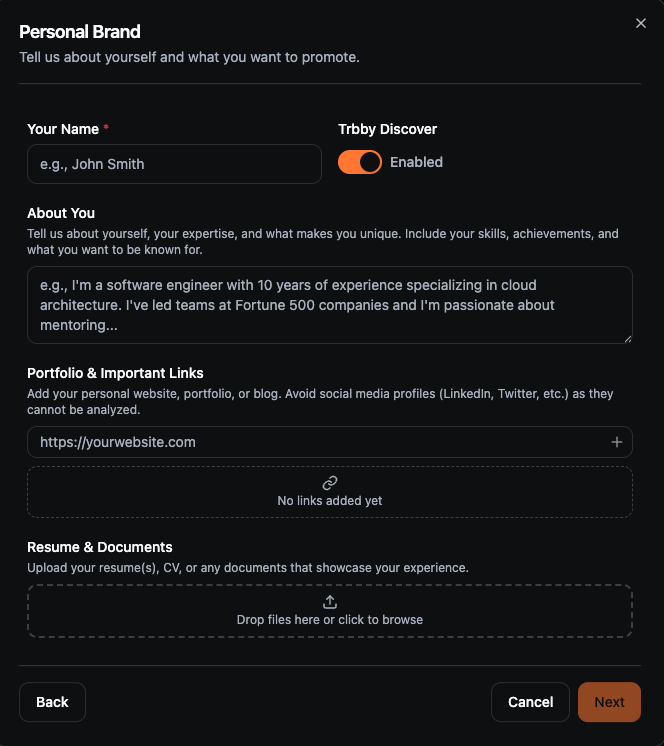
Personal Brand: name, about you, portfolio and links, resume or documents
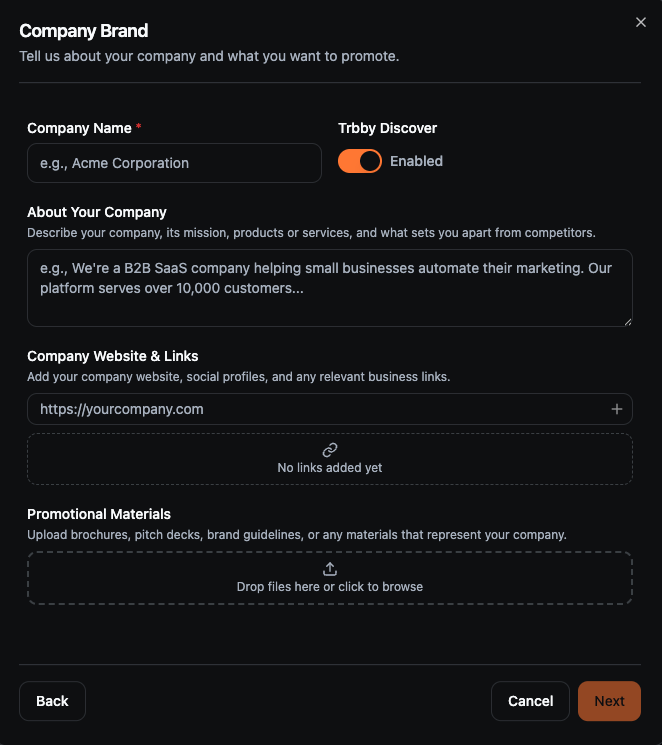
Company Brand: company name, about the company, website and links, promotional materials
Trbby will analyze your inputs and generate a project description and target audience
Review and edit the generated details to match your direction
Click Create Project
Once created, your project is ready and you can start creating content.
Building a Personal Brand
If you select Personal Brand, you’ll provide details about yourself so Trbby can generate content aligned with your voice and goals.
You can include:
Your name
A short description of your experience and what you want to be known for
Portfolio or relevant links
Resume and/or supporting documents
Company Brand
If you select Company Brand, you’ll provide details about your business so Trbby can generate content aligned with your brand and messaging.
You can include:
Company name
A description of your company and what sets it apart
Website and relevant links
Promotional materials such as pitch decks or brand assets
Need Help?
If you run into any issues, our team is happy to help. You can reach us in our Discord community or by emailing our support team at support@trbby.com.
Was this helpful?
Still need help? Ask the team